

The HTTP header - an overview for Internet users

When you visit a website, your browser sends a request to the web server to obtain data or information from it, e.g. an HTML file (i.e. a web page). Both in the request - the HTTP-Request – and in the server’s response, some meta-information is exchanged in addition to the actual data. This is summarized in the HTTP header. We explain the function of the HTTP header and its most important fields.
- Great premium TLDs at affordable prices
- Simple registration & transfer
Function of a Header, explained with an example
When the website www.example.com is opened, the web server not only opens the website itself, but also sends out – invisible to users – the following header:
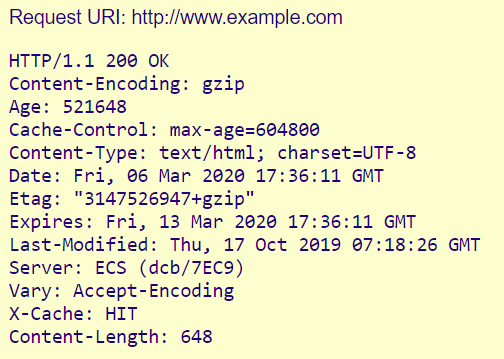
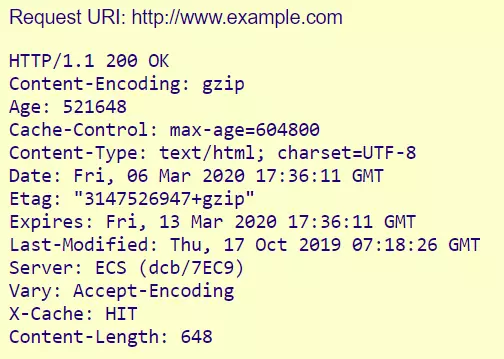
The individual lines are called “header fields”. Each (except the first) consists of a name/value pair separated by a colon.
Key to the individual symbols:
- HTTP/1.1 is the valid HTTP protocol version.
- 200 OK is the Status-Code. It says that the server has received, understood and accepted the request.
- Content-Encoding and Content-Type tell us about the type of file.
- Age, Cache-Control, Expires, Vary and X-Cache refer to the caching of the file.
- Etag and Last-Modified are used for version control of the delivered file.
- Server refers to the web server software.
- Content-Length is the file size in bytes.
As you can see, this header information is mainly used for coordination between the client (browser) and the server. It is ensured that the client can understand the form of the file, that the file is sufficiently up-to-date and that the file size meets the browser’s expectations.
The header lines shown in the example are only a small part of the available header fields. In total, there are almost 100 HTTP header fields, of which about 30 are for specifying HTTP requests, about 30 for the server response, and a whole range of other header fields that serve different purposes and are partly (still) not standardized.
The following overview explains the most important header fields.
The most important HTTP request and response headers: An Overview
HTTP Request (Client Request)
| Header Field | Meaning | Example |
|---|---|---|
| Accept | Which content types the client can process; if the field is empty, these are all content types. | Accept: text/html, application/xml |
| Accept-Charset | Which character sets the client can display. | Accept-Charset: utf-8 |
| Accept-Encoding | Which compressed formats the client supports. | Accept-Encoding: gzip |
| Accept-Language | Requested language version | Accept-Language: en-US |
| Authorization | Authentication data (e.g. for a login) | Basic WjbU7D25zTAlV2tZ7== |
| Cache-Control | Options of the caching mechanism | Cache-Control: no-cache |
| Cookie | Cookie stored for this server | Cookie: $Version=1; Content=23 |
| Content-Length | Length of the request body | Content-Length: 212 |
| Content-Type | MIME type of the body; relevant for POST and PUT requests | Content-Type: application/x_222-form-urlencoded |
| Date | Date and time of the request | Date: Mon, 9 March 2020 09:02:22 GMT |
| Expect | Sends an expectation to the server, usually the receipt of a large request. | Expect: 100-continue (the server should send code 100 when it is ready to receive the request) |
| Host | Domain name of the server | Host: example.com |
| If-Match | Conditional execution of an action, depending on the matching of a transmitted code | If-Match: „ft678iujhnjio90’pöl” |
| If-Modified-Since | Send only if the requested content has been modified since the specified time | IF-Modified-Since: Mon 2 Mar 2020 1:00:00 GMT |
| If-None-Match | As above, but specified via an ETag (entity tag, see below) | If-None-Match: „cxdrt5678iujhgbvb” |
| If-Range | Requests only the part of the content that was changed or is missing in the client cache | If-Range: Mon 2 Mar 2020 1:00:00 GMT |
| If-Unmodified-Since | Analog IF-Modified-Since | If-Modified-Since: Mon 2 Mar 2020 1:00:00 GMT |
| Max-Forwards | Defines the maximum number of times the server response may be forwarded | Max-Forwards: 12 |
| Proxy-Authorization | Used to authenticate the client to a proxy server | Proxy-Authorization: Basic WjbU7D25zTAlV2tZ7== |
| Range | Specifies a portion of the requested content | Range: bytes=0-9999 |
| Referrer | URL of the resource from which the request comes (i.e. from which the link was made) | Referrer: https://example.com/index.html |
| TE | Accepted extension transfer coding | TE: gzip, deflate |
| User-Agent | User-Agent of the client (simply put: the browser) | Mozilla/5.0 (Windows NT 10.0; Win64; x64) AppleWebKit/537.36 (KHTML, like Gecko) Chrome/80.0.3987.132 Safari/537.36 |
- Improve your Google ranking without paying an agency
- Reply to reviews and generate social media posts faster
- No SEO or online marketing skills needed
HTTP-Response (Server Response)
| Header Field | Meaning | Example |
|---|---|---|
| Accept-Ranges | Which units the server accepts for the range specifications (see above) | Accept-Ranges: bytes |
| Age | Number of seconds the object has been in the cache | Age: 2300 |
| Allow | Permitted request types for a specific resource | Allow: GET, POST, HEAD |
| Cache-Control | Whether and how long the object may be kept in the cache | Cache-Control: max-age=4800 |
| Connection | Preferred type of connection | Connection: close |
| Content-Encoding | Type of compression | Content-Encoding: deflate |
| Content-Language | Language of the resource | Content-Language: en-US |
| Content-Length | Size of the body in bytes | Content-Length: 135674 |
| Content-Location | Location of the file if it comes from a different location than the one requested (e.g. CDN) | Content-Location: /example.com |
| Content-Security-Policy | Security concepts of the server | Content-Security-Policy: frame-src ’none‘; object-src ’none‘ |
| Content-Type | MIME type of the requested file | Content-Type: text/tml; charset=utf-8 |
| Date | Time of the response | Date: Mon 2 Mar 2020 1:00:00 GMT |
| ETag | Marks a specific version of the file | ETag: „vt6789oi8uztgfvbn” |
| Expires | When the file should be considered obsolete | Expires: Tue 3 Mar 2020 1:00:00 GMT |
| Last-Modified | Time of the last modification of the file | Last-Modified: Mon 2 Mar 2020 1:00:00 GMT |
| Location | Identifies the location to which the request was forwarded | Location: https://www.example.com |
| Proxy-Authenticate | Says if and how the client must authenticate to the proxy | Proxy-Authenticate: Basic |
| Retry-After | Sets from when the client should request again if the resource is temporarily unavailable (date or seconds) | Retry-After: 300 |
| Server | Identification of the server | Server: Apache |
| Set-Cookie | Sets a cookie at the client | Set-Cookie: UserID=XY; Max-Age=3800; Version=1 |
| Transfer-Encoding | Compression method | Transfer-Encoding: gpzip |
| Vary | Sets which header fields should be considered as varying if a file is requested from the cache. | Vary: User-Agent (= the server holds different file versions depending on the user agent) |
| Via | Which proxies the response was sent through. | Via: 1.1www.example.com |
Reviewer

Julia Hertler
With over 18 years of experience in content marketing, Julia Hertler has deep expertise in digital communications. For the past 10 years, she has specialized in the areas of domains and hosting at the IONOS Digital Guide, making complex technical topics easy to understand.